


The Shipment Monitoring section provides a consolidated view of shipped orders and their shipment-related details. Users can filter, search, sort, and export shipment information.
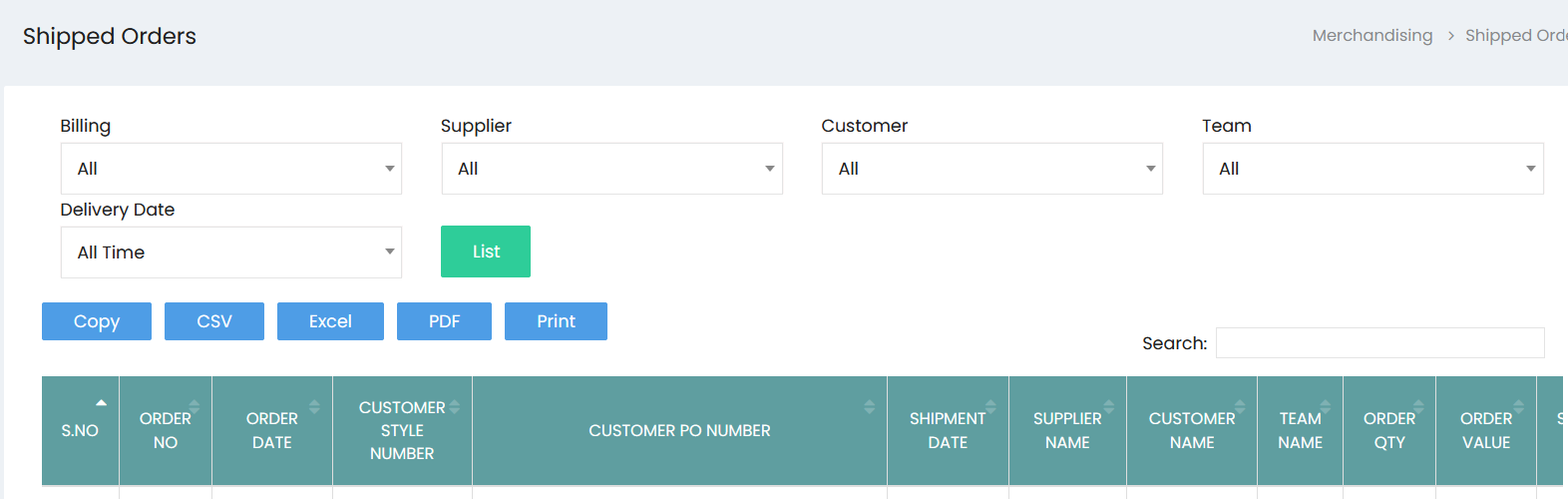
Shipment Filters
The available filters allow users to narrow down the shipment list:
- Billing – Filter shipments based on billing information.
- Supplier – Filter shipments by supplier.
- Customer – Filter shipments by customer.
- Team – Filter shipments by team.
- Delivery Date – Filter shipments based on the delivery date or available time period.
- List – Apply the selected filters and display the matching shipped orders.
Shipped Orders List
The shipped orders table displays the following details:
- S.No – Displays the serial number.
- Order No – Displays the order number.
- Order Date – Displays the order date.
- Customer Style Number – Displays the customer's style number.
- Customer PO Number – Displays the customer purchase order number.
- Shipment Date – Displays the shipment date.
- Supplier Name – Displays the supplier name.
- Customer Name – Displays the customer name.
- Team Name – Displays the team associated with the shipment.
- Order Qty – Displays the total quantity ordered.
- Order Value – Displays the total value of the order.
Search and Export
The shipment monitoring list provides the following options:
- Search – Search for a specific shipment or order record.
- Copy – Copy the displayed shipment data.
- CSV – Export the shipment data in CSV format.
- Excel – Export the shipment data in Excel format.
- PDF – Export the shipment data in PDF format.
- Print – Print the shipment monitoring list.