


Overview
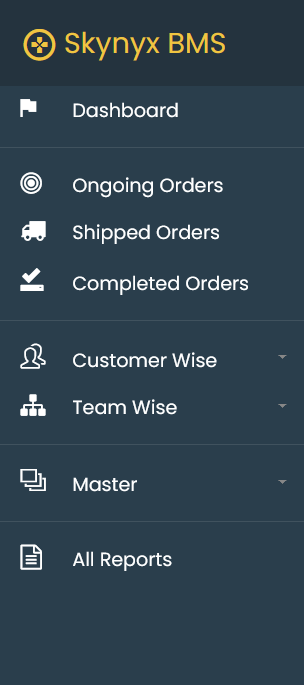
The Navigation & Search section in Skynyx BMS provides access to the different modules and functions available in the system. The navigation menu is displayed on the left side of the screen, allowing users to move between dashboards, orders, customer information, teams, master data, and reports.
Navigation Menu
Dashboard
The Dashboard provides an overview of key business information, including ongoing orders, shipments, orders at risk, order quantities, and order values.
Ongoing Orders
The Ongoing Orders menu provides access to orders that are currently in progress. Users can view and manage active orders and monitor their status.
Shipped Orders
The Shipped Orders menu provides access to orders that have been shipped. Users can view shipment-related order information and track shipped orders.
Completed Orders
The Completed Orders menu provides access to orders that have been completed. Users can review completed order information and maintain the history of finished orders.
Customer Wise
The Customer Wise menu provides customer-based information and order details. The expandable menu allows users to access customer-related options.
Team Wise
The Team Wise menu provides team-based information and activities. The expandable menu allows users to access team-related options.
Master
The Master menu provides access to master data used throughout Skynyx BMS. The expandable menu allows users to access and manage the available master information.
All Reports
The All Reports menu provides access to the reporting section, where users can view available business and operational reports.
Search
The search functionality allows users to quickly locate relevant information within the available module or list. Users can enter the required search term in the available search field to filter and identify matching records.
Search can be used to locate information based on the available fields and data within the selected section.
Navigation Structure
The main navigation structure of Skynyx BMS is organized as follows:
Dashboard → Orders → Customer Wise → Team Wise → Master → All Reports
The order-related sections are further categorized into Ongoing Orders, Shipped Orders, and Completed Orders for easy access and monitoring.