


The Shipment Workflow section allows users to manage packing lists and track shipment-related information associated with an order.
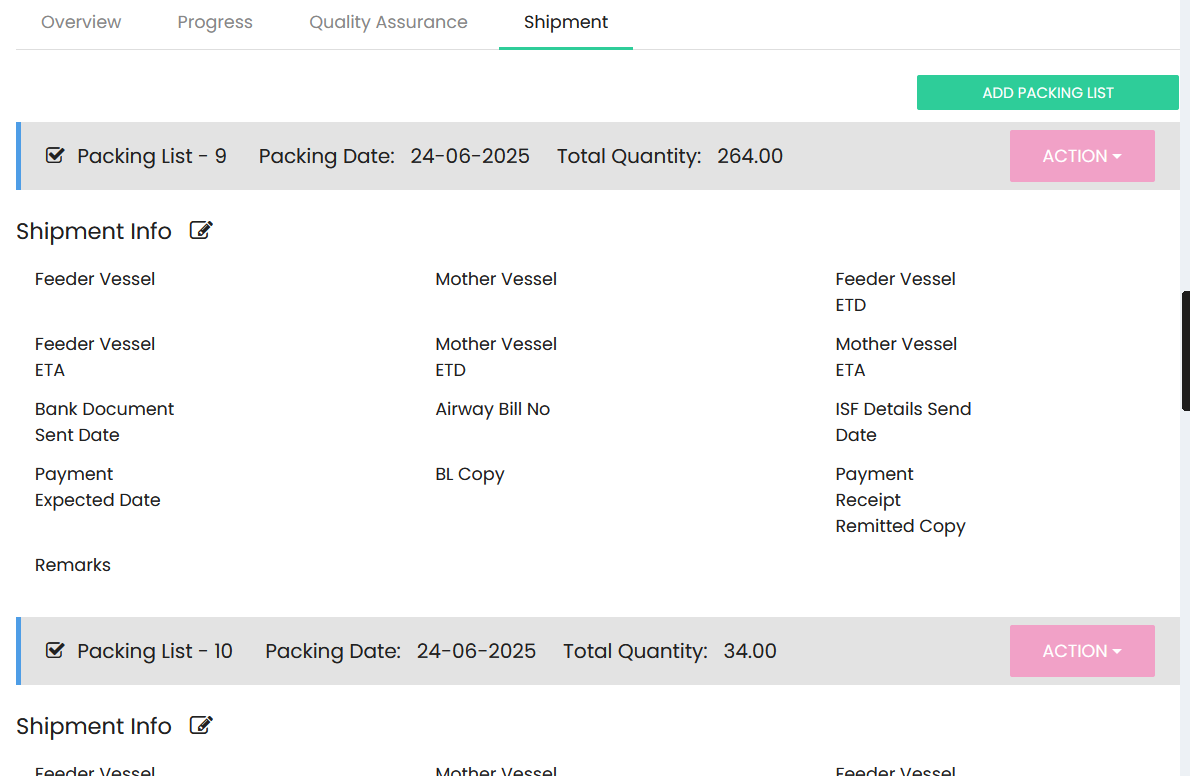
Packing List
The Shipment section displays the packing lists created for the order. Each packing list provides the following details:
- Packing List – Displays the packing list number.
- Packing Date – Displays the date on which the packing list was created.
- Total Quantity – Displays the total quantity included in the packing list.
- Action – Provides options to manage the packing list.
Select ADD PACKING LIST to create a new packing list.
Shipment Info
The Shipment Info section provides shipment-related details for each packing list:
- Feeder Vessel – Displays the feeder vessel information.
- Mother Vessel – Displays the mother vessel information.
- Feeder Vessel ETD – Displays the estimated time of departure of the feeder vessel.
- Feeder Vessel ETA – Displays the estimated time of arrival of the feeder vessel.
- Mother Vessel ETD – Displays the estimated time of departure of the mother vessel.
- Mother Vessel ETA – Displays the estimated time of arrival of the mother vessel.
- Bank Document Sent Date – Displays the date on which the bank document was sent.
- Airway Bill No – Displays the airway bill number.
- ISF Details Send Date – Displays the date on which ISF details were sent.
- Payment Expected Date – Displays the expected payment date.
- BL Copy – Provides the Bill of Lading copy information.
- Payment Receipt – Provides payment receipt information.
- Remitted Copy – Provides the remitted payment copy information.
- Remarks – Displays additional shipment-related remarks.
Each packing list maintains its own shipment information, allowing multiple packing lists and their corresponding shipment details to be tracked within the order.