


The Approvals section allows users to create, assign, monitor, and manage approval activities associated with an order.
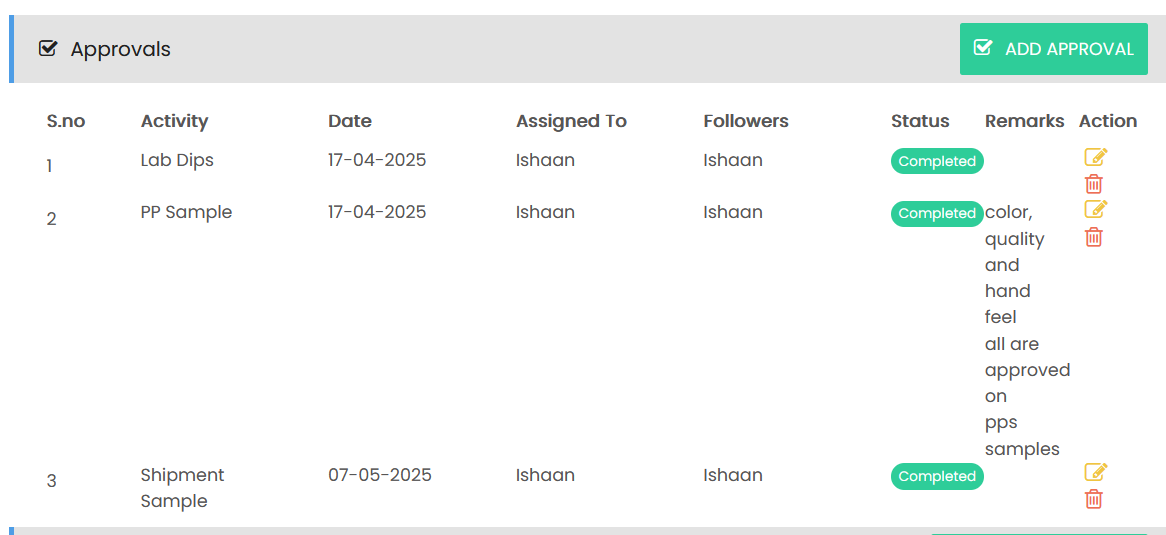
Approval List
The approval list displays all approval activities with the following information:
- S.No – Displays the approval sequence number.
- Activity – Displays the name of the approval activity.
- Date – Displays the approval date.
- Assigned To – Displays the user responsible for the approval.
- Followers – Displays the users following the approval activity.
- Status – Displays the current approval status, such as Completed.
- Remarks – Displays comments or additional information related to the approval.
- Action – Provides options to edit or delete the approval.
Adding an Approval
Select ADD APPROVAL to create a new approval activity. Enter the required approval details, including the activity, date, assigned user, followers, status, and remarks.
Approval activities may include items such as Lab Dips, PP Sample, and Shipment Sample, allowing users to track the approval status of key order-related activities.