


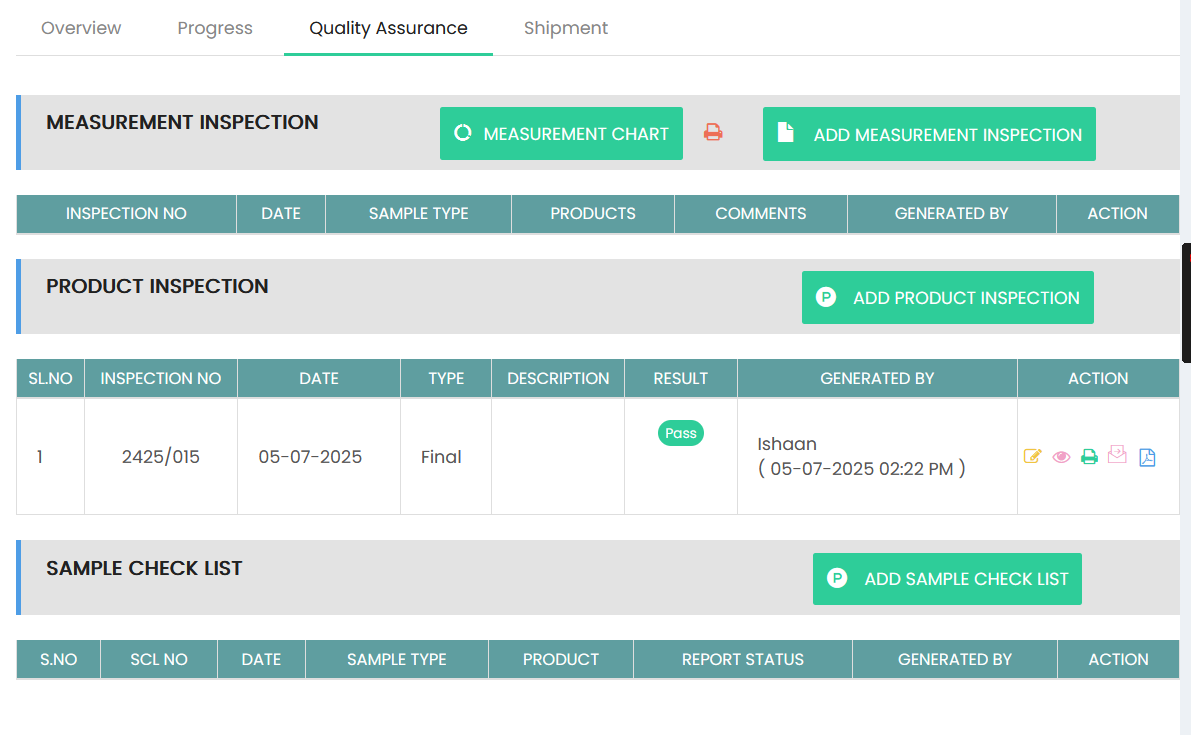
The Quality Reports & Results section provides access to quality-related inspection records and their results, including Measurement Inspection, Product Inspection, and Sample Check List records.
Measurement Inspection
The Measurement Inspection section displays measurement inspection records with the following details:
- Inspection No – Displays the measurement inspection number.
- Date – Displays the inspection date.
- Sample Type – Displays the type of sample inspected.
- Products – Displays the products included in the inspection.
- Comments – Displays comments related to the inspection.
- Generated By – Displays the user who created the inspection.
- Action – Provides options to manage the inspection record.
Select MEASUREMENT CHART to view the measurement chart or ADD MEASUREMENT INSPECTION to create a new measurement inspection.
Product Inspection
The Product Inspection section displays product inspection records and their results:
- Sl.No – Displays the serial number.
- Inspection No – Displays the inspection reference number.
- Date – Displays the inspection date.
- Type – Displays the inspection type.
- Description – Displays the inspection description.
- Result – Displays the inspection result, such as Pass.
- Generated By – Displays the user who created the inspection and the recorded date and time.
- Action – Provides options to edit, view, print, email, or access the inspection report.
Select ADD PRODUCT INSPECTION to create a new product inspection.
Sample Check List
The Sample Check List section displays sample checklist records associated with quality assurance:
- S.No – Displays the serial number.
- SCL No – Displays the Sample Check List reference number.
- Date – Displays the checklist date.
- Sample Type – Displays the sample type.
- Product – Displays the product associated with the checklist.
- Report Status – Displays the current status of the checklist report.
- Generated By – Displays the user who created the checklist.
- Action – Provides options to manage the checklist record.