


The Order Progress & History section provides a chronological view of activities and changes made to an order. It allows users to track order updates, assignments, and status changes.
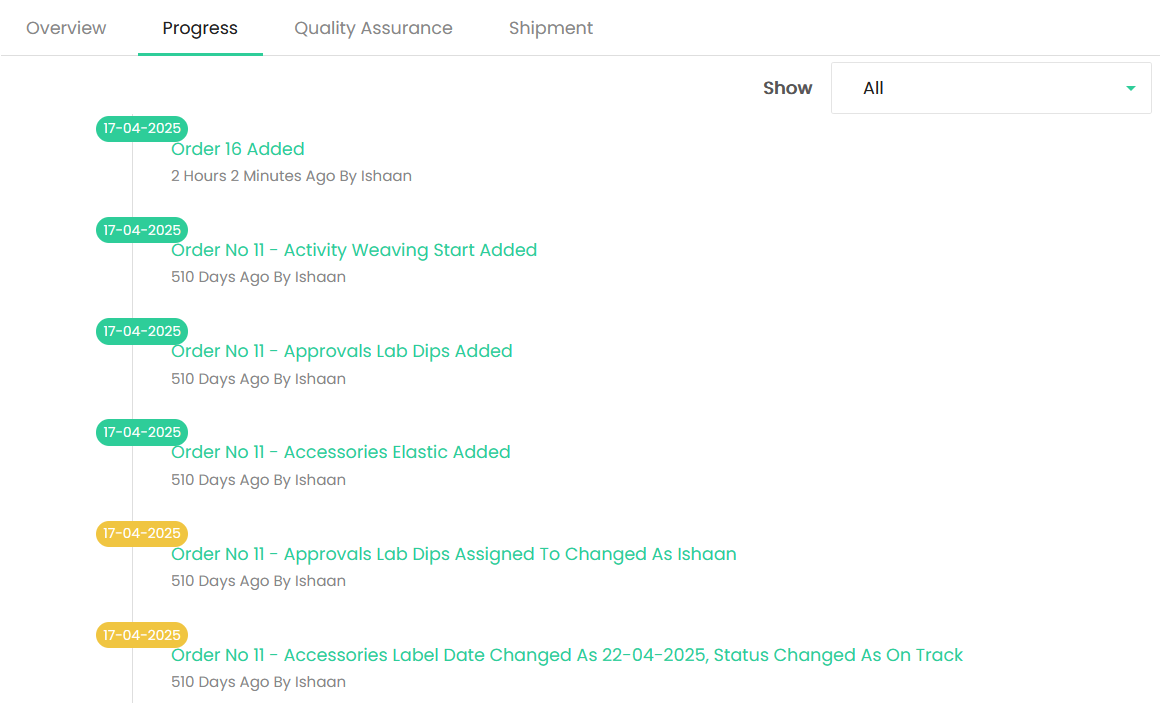
Progress
The Progress tab displays order-related events in chronological order, including:
- Order Added – Records when an order was created.
- Activity Added – Records when an activity was added to the order.
- Approval Added – Records when an approval activity was added.
- Accessories Added – Records when an accessory was added.
- Assignment Changes – Records changes made to the user assigned to an activity or task.
- Date Changes – Records changes made to accessory or activity dates.
- Status Changes – Records changes to the status of an activity or accessory.
Each history entry displays the date, the action performed, and the user who performed the action, along with the time elapsed since the event.
Show Filter
The Show dropdown allows users to filter the progress history based on the available options. Selecting All displays all recorded order activities and changes.
The progress timeline provides a complete history of order updates, making it easy to track actions and changes throughout the order lifecycle.