


The Supplier Information & Commission section allows users to enter supplier details, supplier contact information, and applicable commission details associated with the customer purchase order.
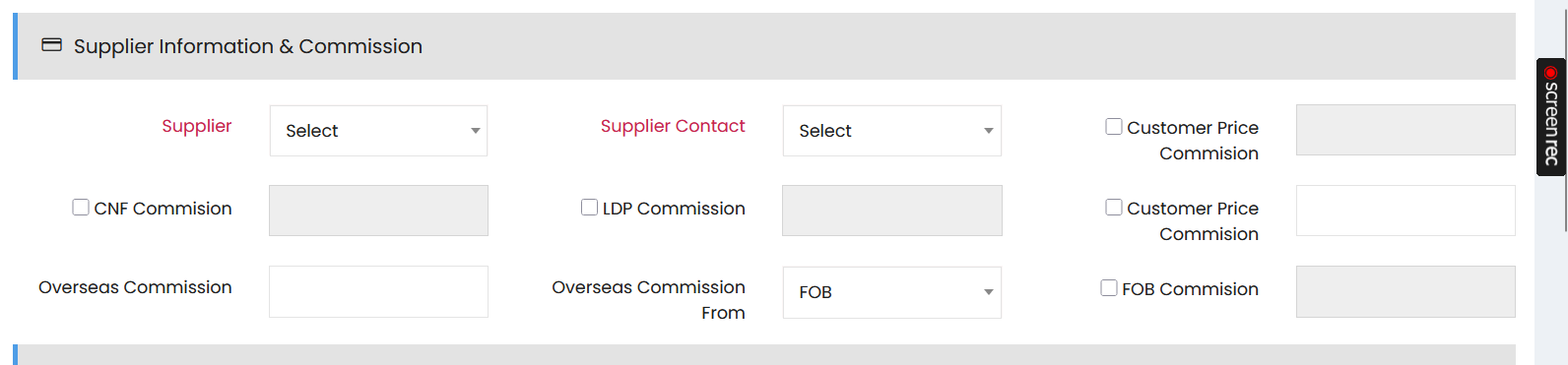
Supplier Information
- Supplier – Select the supplier associated with the purchase order.
- Supplier Contact – Select the relevant contact person for the supplier.
Commission Details
Enter the applicable commission details using the available fields:
- CNF Commission – Select the checkbox and enter the applicable CNF commission.
- LDP Commission – Select the checkbox and enter the applicable LDP commission.
- Customer Price Commission – Select the checkbox and enter the applicable customer price commission.
- Overseas Commission – Enter the applicable overseas commission.
- Overseas Commission From – Select the reference point from which the overseas commission is calculated.
- FOB Commission – Select the checkbox and enter the applicable FOB commission.
The commission fields allow the applicable commission values to be recorded based on the selected commission type.