


Overview
The Products, Styles & Attributes section in Skynyx BMS is used to manage products and services, define product classifications, maintain product attributes and values, and configure pricing and accounting information.
Products & Services
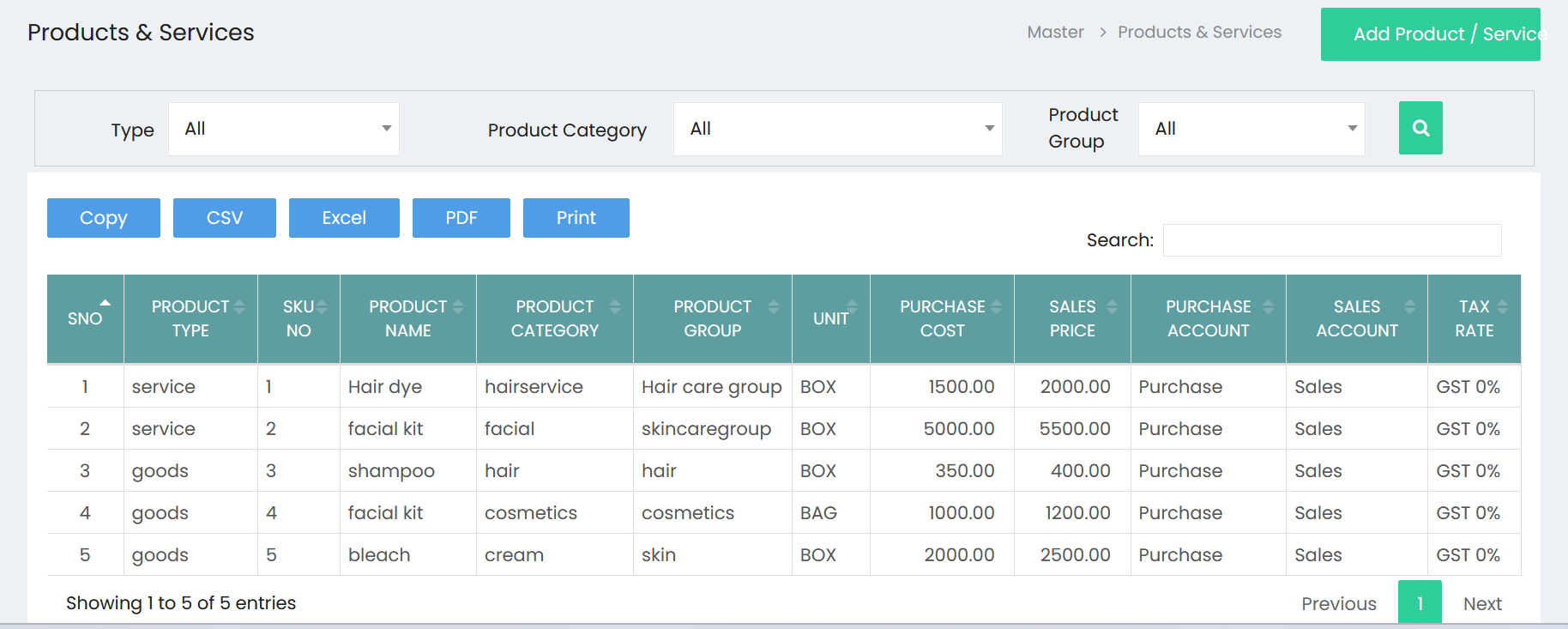
The Products & Services page provides a centralized list of all products and services available in the system.
Filters
Users can filter the product list using:
- Type – Filter products based on Goods or Services.
- Product Category – Filter products by their assigned category.
- Product Group – Filter products by their product group.
- Search – Search for a specific product or service.
Click the Search icon to apply the selected filter criteria.
Product List
The product list displays the following information:
- S.No – Serial number of the product.
- Product Type – Indicates whether the item is Goods or Service.
- SKU No – Unique SKU number assigned to the product.
- Product Name – Name of the product or service.
- Product Category – Category assigned to the product.
- Product Group – Group assigned to the product.
- Unit – Unit of measurement used for the product.
- Purchase Cost – Cost associated with purchasing the product.
- Sales Price – Selling price of the product.
- Purchase Account – Account associated with purchases.
- Sales Account – Account associated with sales.
- Tax Rate – Applicable tax rate for the product.
Export & Print
The product list provides options to:
- Copy – Copy product information.
- CSV – Export product information as a CSV file.
- Excel – Export product information as an Excel file.
- PDF – Export product information as a PDF file.
- Print – Print the product list.
Add Product / Service
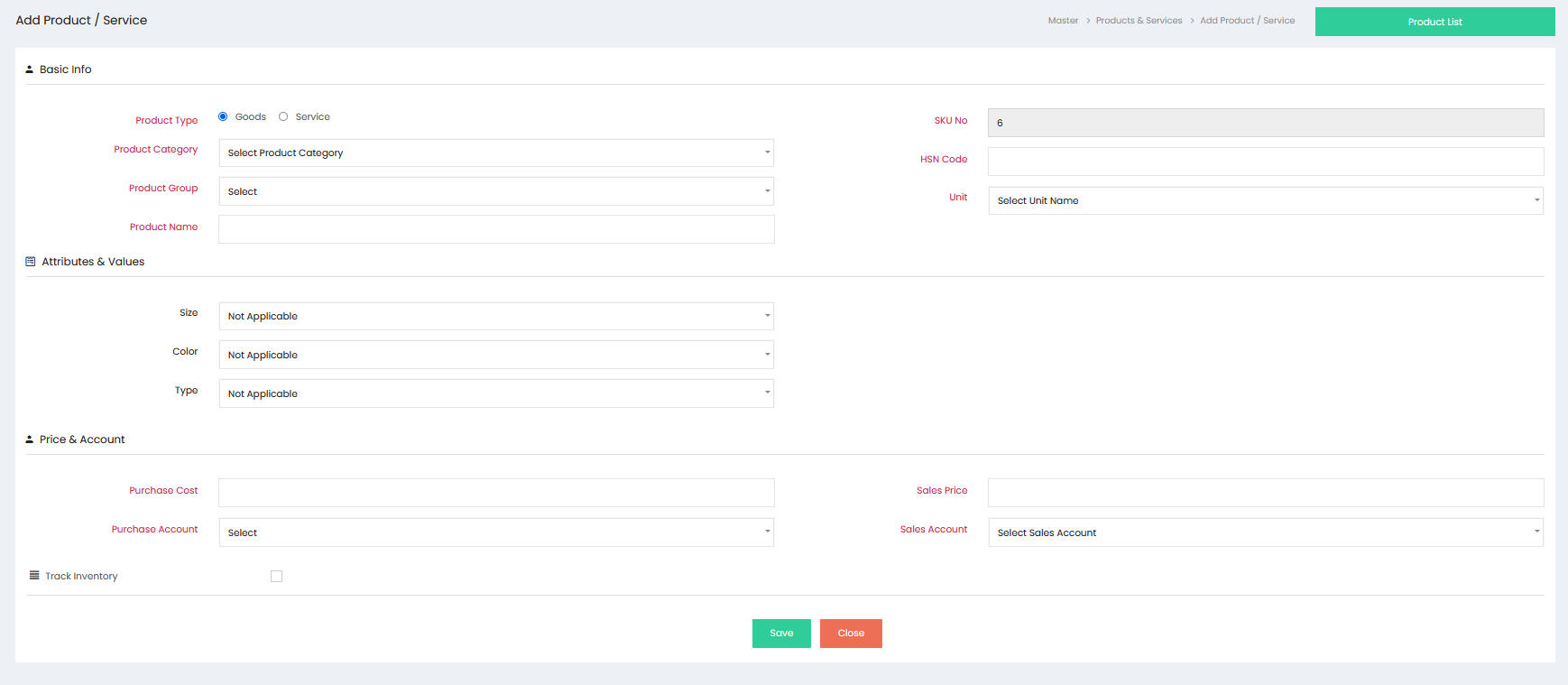
The Add Product / Service page is used to create a new product or service record.
Basic Info
The Basic Info section contains the primary product details.
Product Type
Select the appropriate product type:
- Goods – Used for physical products.
- Service – Used for services provided by the business.
SKU No
The SKU No identifies the product uniquely within the system.
Product Category
Select the appropriate product category.
HSN Code
Enter the applicable HSN code for the product, where required.
Product Group
Select the product group to which the product belongs.
Unit
Select the appropriate unit of measurement for the product.
Product Name
Enter the name of the product or service.
Attributes & Values
The Attributes & Values section allows users to associate predefined attributes with products.
Common attributes may include:
- Size
- Color
- Type
The available attribute values can be selected while creating or managing a product.
Price & Account
The Price & Account section is used to maintain product pricing and accounting information.
Purchase Cost
Enter the purchase cost of the product.
Sales Price
Enter the selling price of the product.
Purchase Account
Select the account associated with product purchases.
Sales Account
Select the account associated with product sales.
Track Inventory
The Track Inventory option allows inventory tracking to be enabled for applicable products.
When enabled, the product can be monitored as part of inventory-related activities.
Save
Click Save to create and store the product or service record.
Close
Click Close to exit the Add Product / Service page without saving the record.
Attributes & Values
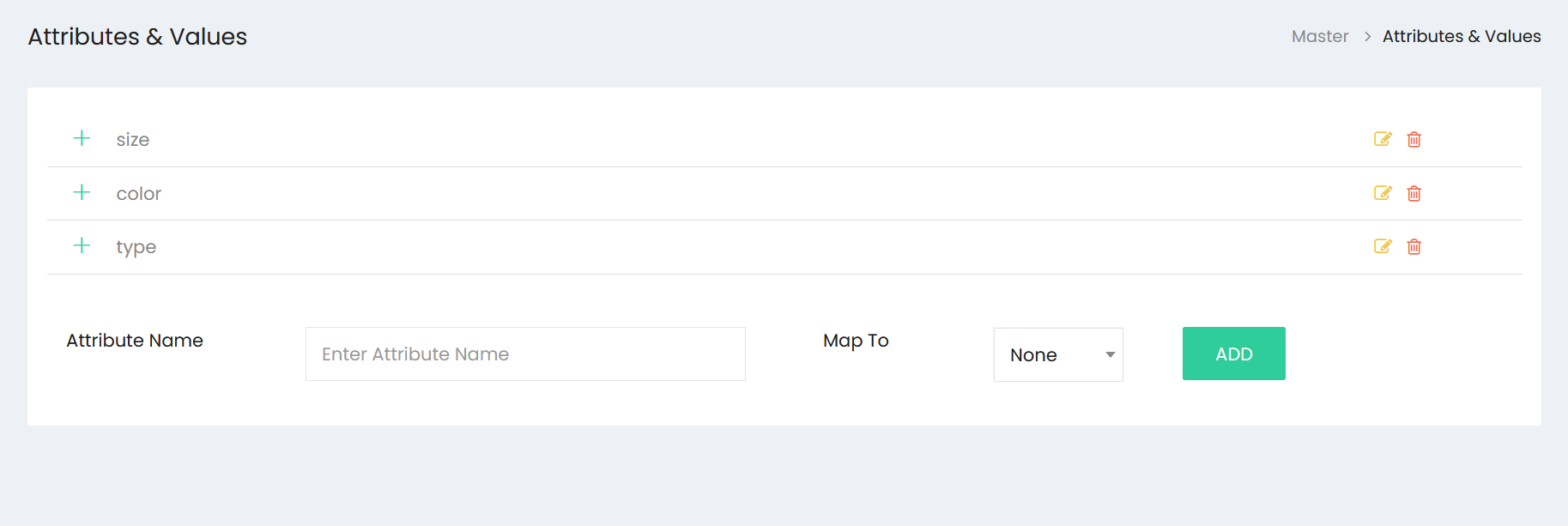
The Attributes & Values section is used to create and manage product attributes that can be associated with products.
Attribute List
The attribute list displays the available attributes, such as:
- Size
- Color
- Type
Each attribute provides options to expand its values, edit the attribute, or delete it.
Add Attribute
To create a new attribute, enter the required information in the attribute section.
Attribute Name
Enter the name of the attribute, such as Size, Color, Material, or Type.
Map To
Select the applicable mapping option for the attribute. The available mapping is displayed through the Map To field.
Add
Click ADD to create the attribute and add it to the attribute list.
Attribute Management
The attribute list provides management options for each attribute:
- Expand (+) – Displays the values associated with the attribute.
- Edit – Allows the attribute information to be modified.
- Delete – Removes the attribute from the list.
Product and Attribute Management
The Products, Styles & Attributes section enables users to:
- Maintain products and services.
- Classify products as Goods or Services.
- Assign product categories and groups.
- Maintain SKU and HSN information.
- Define units of measurement.
- Configure product attributes and values.
- Maintain purchase and sales pricing.
- Assign purchase and sales accounts.
- Enable inventory tracking.
- Manage product attributes through a centralized list.