


The Activities & Task Management feature allows users to create, assign, track, and manage activities and tasks related to an order.
Activities
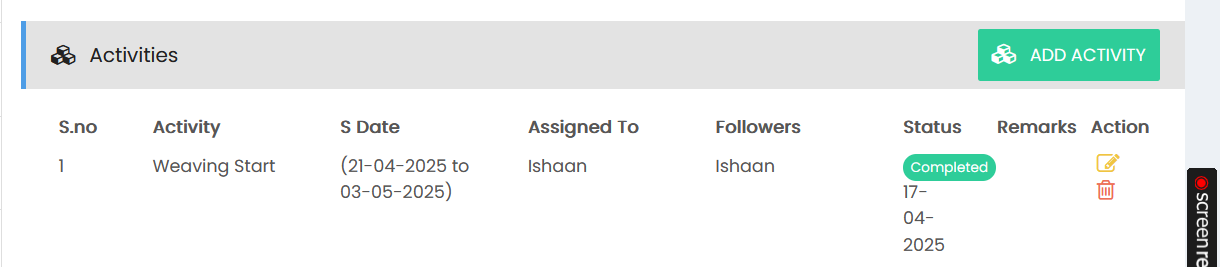
The Activities section displays all activities associated with the order.
- S.No – Displays the activity sequence number.
- Activity – Displays the name of the activity.
- S Date – Displays the scheduled start and end dates for the activity.
- Assigned To – Displays the user responsible for completing the activity.
- Followers – Displays the users following the activity.
- Status – Displays the current status of the activity.
- Remarks – Displays any remarks associated with the activity.
- Action – Provides options to edit or delete the activity.
Select ADD ACTIVITY to create a new activity.
Adding an Activity
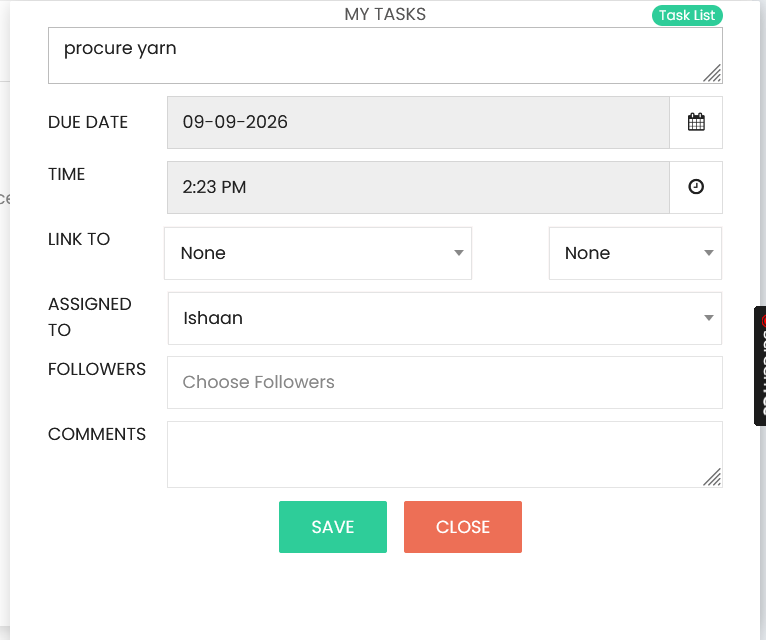
Enter the activity details in the activity form:
- Activity – Enter the activity or task description.
- Due Date – Select the date by which the task should be completed.
- Time – Select the required time for the task.
- Link To – Select the relevant record to which the task is linked.
- Assigned To – Select the user responsible for the task.
- Followers – Select the users who need to follow the task.
- Comments – Enter any additional comments or information.
Select SAVE to create the task or CLOSE to exit the form without saving.
Task Management
Created tasks are displayed with their assigned user, followers, due date, time, and related information. Activities can be updated using the Edit action or removed using the Delete action.