


The Shipping Documents section allows users to record shipment information and upload the documents associated with the shipment.
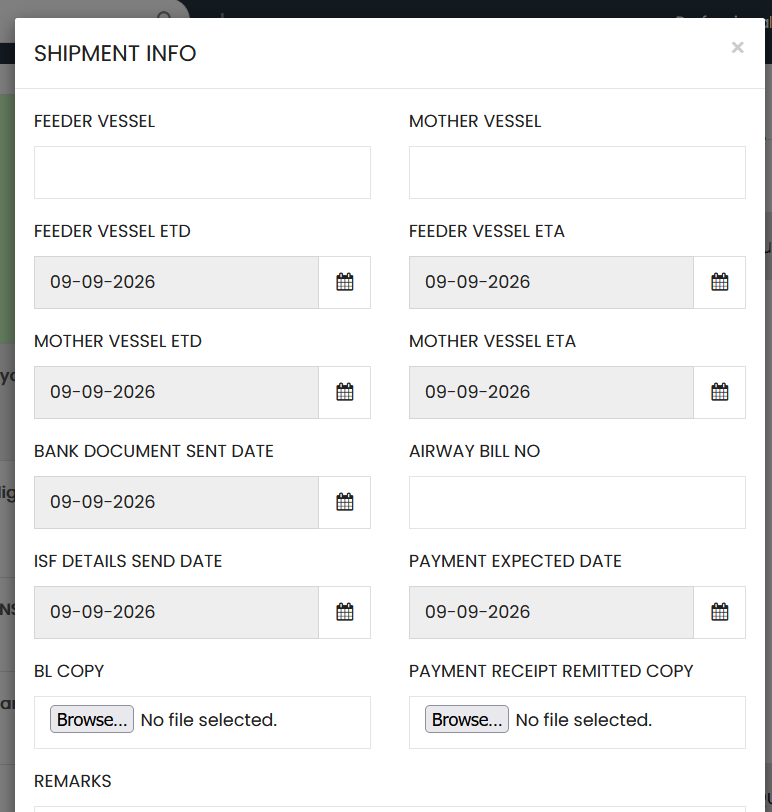
Shipment Information
Enter the required shipment details:
- Feeder Vessel – Enter the name of the feeder vessel.
- Mother Vessel – Enter the name of the mother vessel.
- Feeder Vessel ETD – Select the estimated departure date of the feeder vessel.
- Feeder Vessel ETA – Select the estimated arrival date of the feeder vessel.
- Mother Vessel ETD – Select the estimated departure date of the mother vessel.
- Mother Vessel ETA – Select the estimated arrival date of the mother vessel.
- Bank Document Sent Date – Select the date on which the bank document was sent.
- Airway Bill No – Enter the airway bill number.
- ISF Details Send Date – Select the date on which the ISF details were sent.
- Payment Expected Date – Select the expected payment date.
Shipping Documents
The following documents can be uploaded using the file selection fields:
- BL Copy – Upload the Bill of Lading copy.
- Payment Receipt Remitted Copy – Upload the remitted payment receipt copy.
Remarks
- Remarks – Enter any additional information or comments related to the shipment.