


The Pending Quantity & Activities section provides a shipment-wise summary of order quantities, shipped quantities, total shipped quantity, and the remaining balance quantity.
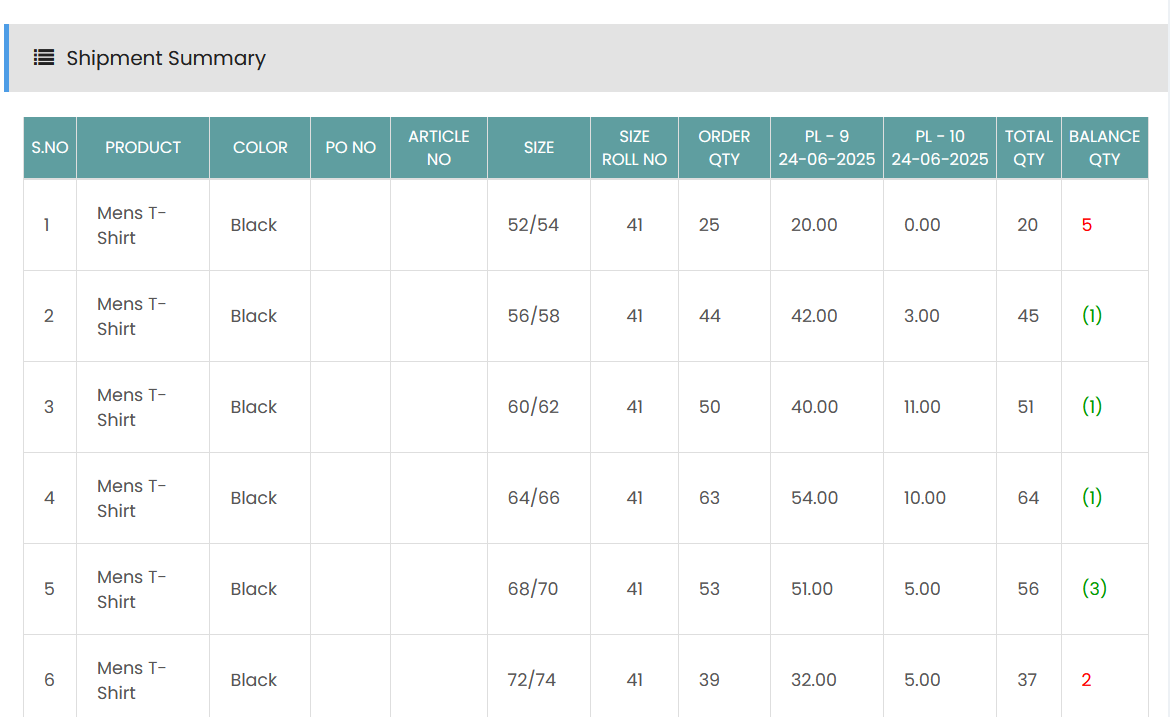
Shipment Summary
The Shipment Summary table displays the following information:
- S.No – Displays the serial number of the product entry.
- Product – Displays the product included in the order.
- Color – Displays the product color.
- PO No – Displays the purchase order number.
- Article No – Displays the article number.
- Size – Displays the product size.
- Size Roll No – Displays the roll number associated with the size.
- Order Qty – Displays the total quantity ordered.
- PL - 9 – Displays the quantity shipped through Packing List 9 along with its packing date.
- PL - 10 – Displays the quantity shipped through Packing List 10 along with its packing date.
- Total Qty – Displays the total quantity shipped across the packing lists.
- Balance Qty – Displays the remaining quantity to be shipped.
Pending Quantity
The Balance Qty indicates the difference between the Order Qty and the Total Qty shipped.
- A positive balance indicates that quantity is still pending for shipment.
- A negative balance indicates that the shipped quantity exceeds the ordered quantity.
- A zero balance indicates that the ordered quantity has been fully shipped.
The Shipment Summary provides a consolidated view of shipment activity and helps track pending quantities for each product and size.