


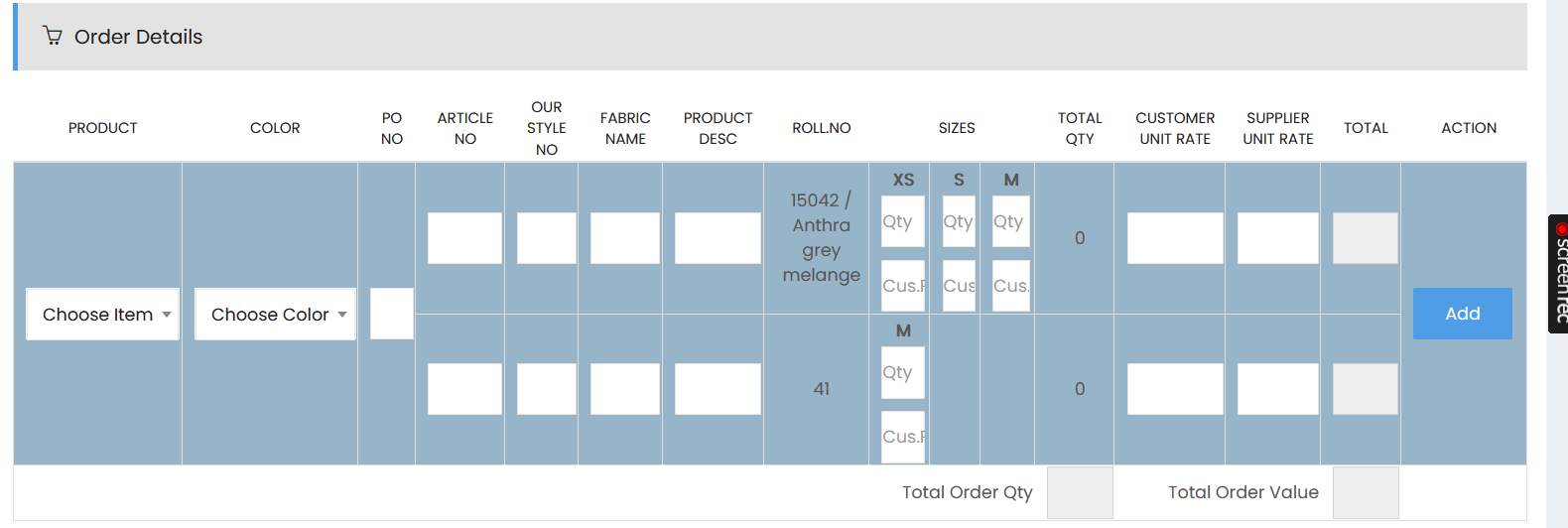
The Order Details section allows users to add products to the purchase order and specify product, color, style, fabric, size, quantity, and pricing information.
Order Details
Add and manage order products using the following fields:
- Product – Select the required product from the Choose Item dropdown.
- Color – Select the applicable product color.
- PO No – Enter the purchase order number.
- Article No – Enter the article number.
- Our Style No – Enter the internal style number.
- Fabric Name – Enter the fabric name.
- Product Desc – Enter the product description.
- Roll No. – Enter or select the applicable roll number.
- Sizes – Enter quantities and customer quantities for the applicable sizes, such as XS, S, M, and other available sizes.
- Total Qty – Displays the total quantity for the product based on the entered size quantities.
- Customer Unit Rate – Enter the unit rate applicable to the customer.
- Supplier Unit Rate – Enter the unit rate applicable to the supplier.
- Total – Displays the total value based on the quantity and applicable rate.
- Action – Select Add to add the product details to the order.
Managing Quantities
For each applicable size, enter the required quantity in the Qty field and the customer quantity in the Cus. field. The system calculates the Total Qty based on the quantities entered for the selected product and sizes.
Order Summary
At the bottom of the Order Details section:
- Total Order Qty – Displays the total quantity of all products added to the order.
- Total Order Value – Displays the total value of the order based on the products, quantities, and rates entered.