


Purpose
The Products & Services module is used to create and maintain products and services. It allows users to define basic product information, attributes, pricing details, and inventory tracking settings.
Navigation
Master → Products & Services
Products & Services List
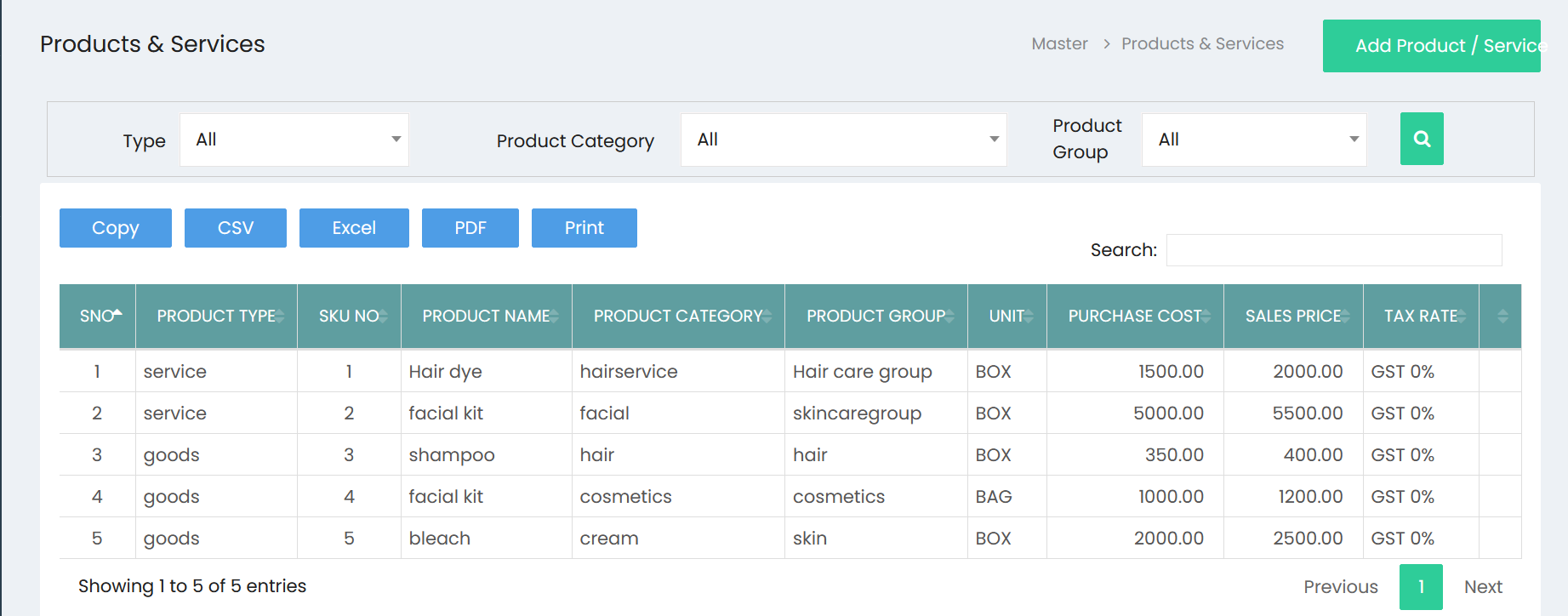
The Products & Services page displays all available products and services.
Available Actions
- Add Product / Service
- Search
- Copy
- CSV
- Excel
Filter Options
The page provides the following filters.
| Filter | Description |
|---|---|
| Type | Dropdown filter. The visible default value is All. |
| Product Category | Dropdown filter. The visible default value is All. |
| Product Group | Dropdown filter. The visible default value is All. |
| Search (????) | Searches based on the selected filter values. |
Search
A Search box is available above the product list.
Use the search box to locate a specific product or service.
Product List
The list displays the following columns.
| Column | Description |
|---|---|
| S.No | Serial number. |
| Product Type | Displays the product type. |
| SKU No | Product SKU number. |
| Product Name | Name of the product or service. |
| Product Category | Associated product category. |
| Product Group | Associated product group. |
| Unit | Product unit. |
| Purchase Cost | Purchase cost. |
| Sales Price | Sales price. |
| Tax Rate | Applicable tax rate. |
Export Options
The following export options are available.
- Copy
- CSV
- Excel
Add Product / Service
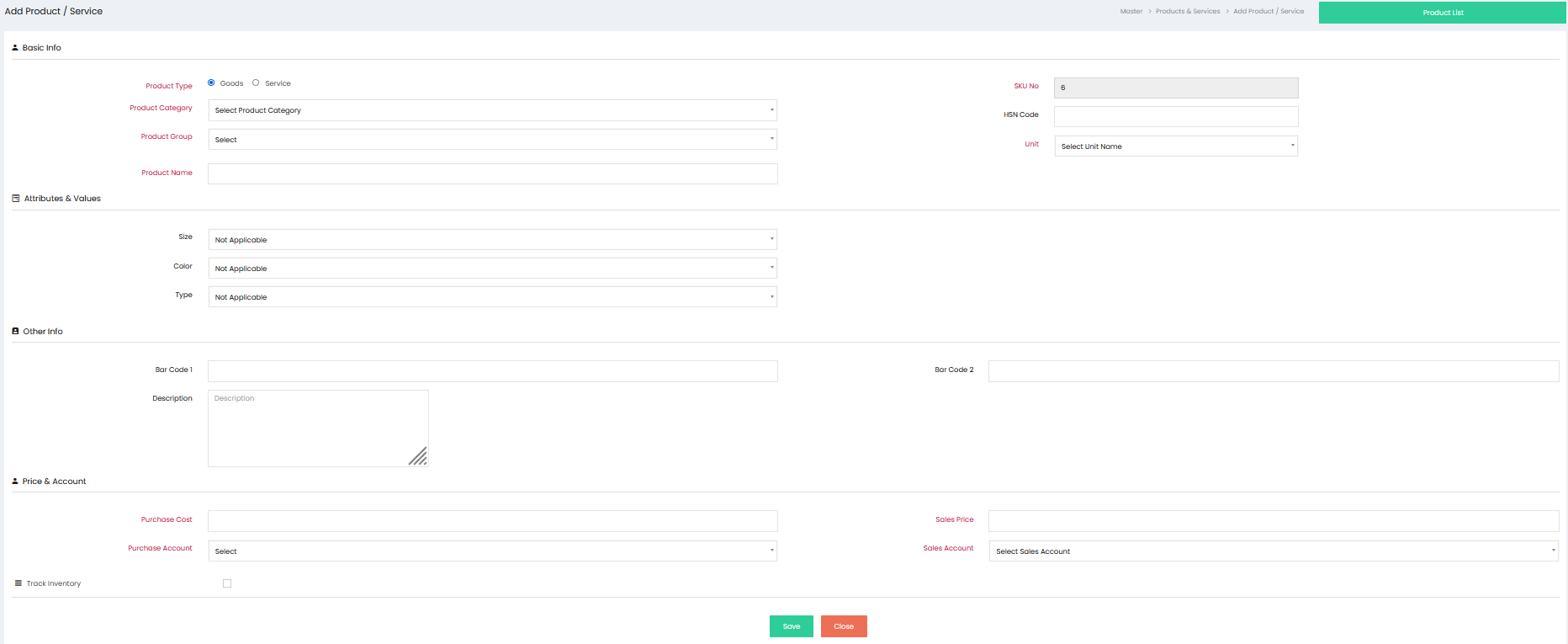
Click Add Product / Service to open the product creation page.
The page is organized into the following sections:
- Basic Info
- Attributes & Values
- Other Info
- Price & Account
- Track Inventory
Basic Info
The Basic Info section contains the following fields.
| Field | Description |
|---|---|
| Product Type | Select Goods or Service. |
| Product Category | Select a product category. |
| Product Group | Select a product group. |
| Product Name | Enter the product or service name. |
| SKU No | Displays the SKU number. |
| HSN Code | Enter the HSN Code. |
| Unit | Select a unit. |
Attributes & Values
The Attributes & Values section contains the following fields.
| Field |
|---|
| Size |
| Color |
| Type |
Each field is displayed as a dropdown. The visible default value is Not Applicable.
Other Info
The Other Info section contains the following fields.
| Field |
|---|
| Bar Code 1 |
| Bar Code 2 |
| Description |
Price & Account
The Price & Account section contains the following fields.
| Field |
|---|
| Purchase Cost |
| Purchase Account |
| Sales Price |
| Sales Account |
Track Inventory
The Track Inventory section contains a checkbox for inventory tracking.
Available Buttons
| Button | Description |
|---|---|
| Save | Saves the product or service. |
| Close | Closes the page without saving. |
| Product List | Returns to the Products & Services list page. |
Workflow – Create a Product / Service
Step 1
Navigate to:
Master → Products & Services
Step 2
Click Add Product / Service.
Step 3
In the Basic Info section:
- Select Product Type.
- Select Product Category.
- Select Product Group.
- Enter the Product Name.
- Review or enter the SKU No.
- Enter the HSN Code.
- Select the Unit.
Step 4
In the Attributes & Values section, select values for:
- Size
- Color
- Type
Step 5
In the Other Info section:
- Enter Bar Code 1.
- Enter Bar Code 2.
- Enter a Description.
Step 6
In the Price & Account section:
- Enter Purchase Cost.
- Select Purchase Account.
- Enter Sales Price.
- Select Sales Account.
Step 7 (Optional)
Select the checkbox under Track Inventory if required.
Step 8
Click Save to create the product or service.
Step 9
Click Product List to return to the list page.
Workflow – View Products & Services
Step 1
Open Master → Products & Services.
Step 2
Use the available filters if required:
- Type
- Product Category
- Product Group
Step 3
Click the Search button.
Step 4
Review the product list.
Step 5
Use the Search box to locate a specific product or service.
Step 6
Use any of the available export options if required:
- Copy
- CSV
- Excel